Executive Summary
AI initiatives are frequently approved on the strength of a compelling demonstration, a narrow license estimate, or an optimistic productivity assumption. These inputs may be useful, but they do not constitute a defensible investment case. They often omit data preparation, evaluation, human review, governance, security, change, adoption, monitoring, recurring operation, retraining, vendor change, and eventual exit. Even when a credible case is approved, the original assumptions are not always carried into delivery and post-launch governance. The result is a break in the evidence chain: approval is based on one set of expectations, while later continuation decisions are made with different or incomplete information.
Resource 08 addresses this break by combining two related decision processes within one controlled workbook:
- The investment-case decision asks, “Is the proposed AI investment financially defensible?” It brings together the current-state baseline, lifecycle cost, measurable benefits, uncertainty, financial scenarios, downside thresholds, and a four-state recommendation: Proceed, Proceed with Controls, Rework / Defer, or Do Not Proceed.
- The lifecycle decision asks, “Given the latest evidence, what should happen next?” It uses fifteen KPIs covering business justification, accountability, cost sustainability, value realization, and lifecycle drift to support one of six recommendations: Stop, Pause, Redirect, Re-scope, Continue, or Accelerate.
These two decisions are intentionally separate. The investment case is a forecast-based assessment used to determine whether a proposal is ready to receive funding. The lifecycle dashboard is an evidence-based assessment used to determine whether continued funding and the current course remain justified. A sound forecast can later be invalidated by cost growth, weak adoption, missing baselines, deteriorating assumptions, or poor benefit realization. Equally, an initially conditional case can improve when evidence becomes stronger and value is demonstrated.
The workbook offers more than a financial calculator. Its value is the connection it creates across the initiative lifecycle:
- A current-state cost pool clarifies the economic area that AI could influence without claiming the whole pool as savings.
- A twelve-group cost taxonomy surfaces build, run, governance, monitoring, retraining, contingency, opportunity, and exit costs.
- Separate benefit categories reduce the risk of presenting capacity value, hard-dollar savings, avoided cost, and soft value as if they were interchangeable.
- Best, Base, and Worst scenarios, probability weights, a hurdle rate, and downside thresholds make uncertainty visible.
- A KPI evidence log carries the approved case into delivery and operation.
- Decision rules make the basis of the dashboard recommendation visible.
- Human sign-off, override rationale, actions, owners, and review dates preserve accountability.
The workbook is designed to complement, not replace, the other AIPM Toolkit resources. Resource 06 provides an early business-case health check. Resource 07 assesses pre-commitment readiness. Resource 08 develops the quantified investment case and supports ongoing lifecycle decisions. Governance resources define roles and controls. Resource 09 explains the integrated workbook build. PRIISM provides an additional financial-authority lens. Benefits and ROI resources provide deeper measurement support.
The workbook is a controlled template for one initiative, not a multi-project portfolio system. Review Log records are append-only static gate records, the Resource 08 selector defaults to Latest Review, and the AI comparison follows the selected project cost source. The Cost Controls sheet remains approved guidance rather than a calculation engine. Dashboard rule precedence and native-Excel release validation remain open. Section 18 distinguishes closed, partially resolved, open, and deferred items.
Used with disciplined ownership, source documentation, Finance validation, append-only evidence, static decision snapshots, and accountable human authorization, Resource 08 can provide a strong bridge between AI ambition and defensible investment governance.
1. Purpose and Scope
1.1 Purpose
The purpose of Resource 08 is to help organizations answer two connected questions throughout the life of an AI initiative:
- Should the organization commit resources to this initiative?
- Does the latest evidence continue to justify the current level and direction of investment?
The workbook provides a structured place to capture assumptions, estimate lifecycle cost, define measurable benefits, model uncertainty, evaluate financial outcomes, log operating evidence, apply documented decision rules, and record the accountable human decision.
1.2 Scope
The workbook supports:
- New AI ideas, pilots, proofs of concept, scaled rollouts, and strategic AI initiatives
- Generative AI productivity tools, retrieval solutions, machine-learning applications, AI-enabled workflows, and agentic solutions, subject to suitable adaptation of inputs
- Initial business-case development and funding requests
- AI-versus-current-state and AI-versus-non-AI option discussion
- Delivery and implementation gate reviews
- Go-live readiness reviews
- Post-go-live benefit and adoption reviews
- Cost-to-complete and funding-sustainability discussion
- Annual renewal, re-buy, renegotiation, continuation, re-scope, and retirement decisions
- Documentation of recommendation, authorization, conditions, override rationale, and follow-up actions
1.3 What the workbook does not do
The workbook does not:
- Authorize expenditure or replace an organization’s delegated authority
- Establish that an AI solution is technically, legally, ethically, operationally, or regulatorily acceptable
- Replace detailed solution architecture, technical feasibility, privacy, security, legal, procurement, model-risk, or compliance assessments
- Prove benefits merely because they have been forecast
- Turn capacity released into cash savings automatically
- Provide market-standard pricing or universal financial thresholds
- Operate as a portfolio database or enterprise system of record
- Automatically collect actual cost, adoption, or benefit data from source systems
- Eliminate the need for independent review of formulas, assumptions, evidence, and decision logic
1.4 Appropriate use
Resource 08 is most useful where a proposal has passed an initial screening and requires a more complete, transparent, and reviewable investment case. It is also useful when an approved initiative needs a common evidence structure for delivery and post-launch reviews.
For small exploratory activities, users may begin with Resources 06 and 07 and use a proportionate subset of Resource 08. For scaled or strategic investments, the full cost, benefit, scenario, evidence, and decision workflow should be applied.
2. Position within the AIPM Toolkit
2.1 The evidence chain
Resource 08 sits at the point where governance concepts become an executable investment and lifecycle decision process. Its relationship to the wider toolkit can be understood as one evidence chain:
- Define the business problem, intended outcome, stakeholders, and governance context.
- Screen the early business case and identify critical weaknesses.
- Assess readiness before material commitment.
- Cost the full lifecycle, including hidden and recurring exposure.
- Value the benefits without confusing capacity, hard-dollar, avoided-cost, and intangible value.
- Decide whether the initial investment is defensible.
- Monitor actual cost, performance, adoption, and value evidence.
- Reassess whether the initiative should stop, pause, redirect, re-scope, continue, or accelerate.
- Record the accountable human decision, controls, rationale, and next review.
2.2 Relationship to key resources
| Resource | Primary contribution | Handoff to or from Resource 08 |
|---|---|---|
| 00 - Practitioner Guide | Navigation and use of the complete toolkit | Identifies when Resource 08 should be used and how it connects with the component set |
| 01 - Core White Paper | Ontology, taxonomy, value delivery, and Human-in-Command foundation | Provides the concepts and relationships reflected in the workbook’s costs, outcomes, KPIs, governance triggers, and decisions |
| 02 - Governance Operating Model | Roles, decision rights, forums, accountability, and escalation | Provides the operating context within which workbook recommendations are reviewed and authorized |
| 03 - Practical Application Guide | Application of governance and value-delivery concepts | Supports tailoring, evidence collection, and practical implementation around the workbook |
| 04 - Governance Intelligence and Semantic PMO Roadmap | Future evolution toward connected governance intelligence | Positions the workbook as a structured precursor to more integrated evidence and decision systems |
| 05 - Reference Assets and Implementation Templates | Governance records and implementation aids | Supplies supporting records, registers, and control artifacts around the financial and lifecycle decision |
| 06 - AI Project Business Case Quick Health Checklist | Rapid early health check | Identifies whether a proposal is sufficiently credible to justify deeper development in Resource 08 |
| 07 - AI Project Pre-Commitment Readiness Scoring Grid | Structured readiness assessment | Supplies readiness evidence and a verdict that can inform the workbook’s business-case and lifecycle KPIs |
| 08 - Workbook and this guide | Quantified investment case and evidence-based lifecycle decision support | Connects forecast, actual evidence, recommendation, and human decision |
| 09 - Change Log and Build Summary | Technical history of the combined workbook | Explains what was retained, removed, moved, hidden, or added when the two source models were integrated |
| PRIISM financial-authority resource | Financial-authority and viability lens | Provides an additional governance layer for testing the financial defensibility and authority implications of the recommendation |
| 11 - Benefits, ROI Tracking and Agent | Deeper benefits and ROI support | Strengthens benefit definitions, measurement strategy, expected-versus-actual tracking, and value realization |
2.3 Why a separate companion guide is needed
The workbook includes a Start_Here sheet and Resource 09 provides a build summary. Neither fully explains the value of the tool, the meaning of its financial and lifecycle outputs, the division of responsibilities, the evidence controls required, or the current-release limitations. This companion guide fills that gap while leaving Resource 09 as the technical record of how the integrated workbook was constructed.
3. Value Offered by the Workbook
3.1 A single controlled artifact across the lifecycle
The workbook brings forecast and actual evidence into one controlled artifact without treating them as the same thing. The original investment assumptions remain visible while later review evidence is logged separately. This supports a disciplined comparison between what the organization expected and what it is observing.
3.2 Full lifecycle cost visibility
AI cost is wider than licensing or initial development. The workbook’s cost taxonomy includes internal effort, specialist time, data preparation, evaluation, security, privacy, compliance, governance, adoption, monitoring, human review, retraining, contingency, vendor change, and exit. This helps reduce the common pattern in which an AI proposal appears attractive because essential costs are omitted or absorbed invisibly by operational teams.
3.3 More credible benefit claims
The workbook separates benefit types and asks how each will be measured and owned. It explicitly warns against presenting the full current-state AI-addressable cost pool as guaranteed savings. Productivity or capacity value must be adjusted for adoption, ramp-up, decay, and the percentage of released hours that can create usable value. Hard-dollar reduction should be linked to committed or contract-backed reduction. Soft value should be included only when Finance accepts the proxy and the evidence.
3.4 Explicit uncertainty and downside
Best, Base, and Worst scenarios make uncertainty visible instead of hiding it inside a single point estimate. Probability weights create an Expected NPV. The hurdle rate, minimum Expected NPV, and maximum acceptable Worst-Case loss make the financial decision rule explicit. These features move the discussion from “Is the ROI positive?” to “What assumptions drive the result, what is the credible downside, and what conditions must be controlled?”
3.5 Continued funding discipline
The lifecycle dashboard evaluates whether the business justification remains valid, whether accountable ownership exists, whether cost remains sustainable, whether benefits are being realized, and whether adoption or value is drifting. This reduces sunk-cost continuation and enables a wider range of responses than a binary go/no-go decision.
3.6 Human accountability and auditability
The workbook separates the formula-driven recommendation from the human decision. It provides fields for sign-off, override rationale, actions, owners, due dates, and the next review. The goal is not automated approval. The goal is a transparent, evidence-informed decision that can be explained later.
4. The Two-Decision Model
4.1 Investment-case recommendation
The investment-case engine is forecast-based. It asks whether the proposal is defensible before or at a funding decision. It uses:
- Project and economic assumptions
- Current-state AI-addressable cost pool
- Year 0 build and Years 1-3 run costs
- Measurable benefits by category
- Adoption, ramp, decay, and hours-to-value assumptions
- Best, Base, and Worst certainty factors
- Scenario probabilities
- Hurdle rate and decision thresholds
- NPV, IRR, payback, ROI, and downside results
The four recommendation states are:
| Recommendation | Intended meaning |
|---|---|
| Proceed | The modeled case clears the required financial and downside conditions |
| Proceed with Controls | The case clears the principal Expected NPV and downside conditions, but one or more conditions require explicit mitigation or monitoring |
| Rework / Defer | The case is not yet defensible; assumptions, scope, cost, evidence, or timing should be revised before resubmission |
| Do Not Proceed | The downside exceeds the accepted limit and a viable mitigation path has not been established |
The recommendation does not approve the investment. The accountable authority must consider feasibility, risk, compliance, strategy, affordability, opportunity cost, and any factors outside the model before authorizing a decision.
4.2 Lifecycle recommendation
The lifecycle engine is evidence-based. It asks whether continued funding and the current course remain justified at a delivery, go-live, operating, or renewal review. It uses fifteen logged KPIs and produces one of six recommendations:
| Recommendation | Intended management response |
|---|---|
| Stop | Halt further commitment or operation, subject to safe shutdown and accountable authorization |
| Pause | Suspend progression while missing or critical evidence is resolved |
| Redirect | Change the intended problem, outcome, use case, or value pathway |
| Re-scope | Adjust scope, cost, controls, adoption plan, delivery approach, or operating model |
| Continue | Maintain the current course with normal monitoring |
| Accelerate | Consider controlled scaling where evidence, benefits, economics, and adoption are sufficiently strong |
4.3 Why the recommendations should not be collapsed
The investment case and lifecycle decision serve different moments and rely on different evidence. A proposal may be financially defensible at approval but later require re-scope because adoption is weak. A pilot may initially require controls but later support acceleration when actual benefits and unit economics are strong. Keeping the two recommendations separate preserves the distinction between a forecast and a current evidence reading.
4.4 Recommendation, authorization, and action
Every review should produce three separate records:
- Workbook recommendation: the formula-driven output based on the entered assumptions or evidence.
- Human authorization: the decision made by the person or forum with delegated authority.
- Required action: controls, mitigations, changes, owners, due dates, and the next review.
Agreement between the recommendation and the human decision should still be documented. An override requires greater explanation, not less.
5. Intended Users and Responsibilities
5.1 Primary users
The workbook is intended for coordinated use. No single role is expected to own every input or validate every conclusion.
| Role | Principal responsibilities in Resource 08 |
|---|---|
| Sponsor / Decision Owner | Confirm strategic relevance and affordability; authorize the decision within delegated authority; accept or reject controls and overrides |
| Value Owner | Own the business outcome, benefit case, success criteria, value assumptions, and authority to recommend stopping or changing the initiative |
| Project or Program Manager | Coordinate inputs; maintain the controlled workbook; challenge completeness; manage review cadence; log evidence, decisions, actions, and follow-up |
| PMO | Set model-governance rules; maintain the master template; support consistency; assure evidence quality and decision traceability |
| Finance Partner | Validate rates, cost treatment, scenario assumptions, hurdle rate, thresholds, cash-versus-capacity distinctions, and financial interpretation |
| Business Owner | Define baseline performance; confirm benefit measurement; validate realized value and operational impact |
| Data Owner | Confirm data availability, baseline integrity, assumption validity, measurement access, and evidence confidence |
| Delivery Lead / Technical Owner | Validate feasibility, architecture, delivery effort, technical assumptions, integration, model operation, and remediation cost |
| Security and Privacy Advisors | Validate security, privacy, data-use, monitoring, testing, incident, and control costs |
| Legal and Compliance Advisors | Validate regulatory applicability, contractual obligations, records, disclosures, governance, and exit requirements |
| Adoption / Change Lead | Validate adoption, training, process redesign, workforce transition, and benefit-realization assumptions |
| Steering Committee / Investment Committee | Review material exceptions, strategic-tier decisions, re-baselines, overrides, downside exposure, and cross-functional trade-offs |
5.2 Minimum accountability conditions
Before an investment recommendation is relied upon, the initiative should have:
- A named Sponsor or Decision Owner
- A named Value Owner
- A Finance Partner or equivalent reviewer
- A Project or Program Manager responsible for workbook control
- Owners for the principal cost and benefit assumptions
- A defined source and review date for material evidence
- A decision authority and escalation path
- A next review date and conditions that would trigger an earlier review
5.3 Human-in-Command principle
The workbook is designed to support Human-in-Command governance. A formula can apply agreed thresholds consistently, but it cannot assume accountability for the decision. The human authority must consider the completeness of evidence, the materiality of missing information, non-financial risks, feasibility, regulatory constraints, strategic options, and the consequences of both action and inaction.
6. Workbook Architecture
6.1 Visible working sheets
| Sheet | Main purpose | Typical editor | Key caution |
|---|---|---|---|
| Start_Here | Navigation, workflow, and live investment/lifecycle snapshots | Normally view-only | The lifecycle snapshot reflects the review selected on the Dashboard; it is not necessarily the latest review unless Latest Review is selected |
| Dashboard | Selected-review lifecycle recommendation, rationale, confidence, KPI status, trends, and risk concentration | User changes only the review selector | Formula outputs should not be edited |
| Review Logs | Human decision, alignment or override, rationale, actions, owners, dates, and status | PM and Decision Owner | Current-release formulas do not create fully static historical dashboard snapshots; apply the interim control in Section 18 |
| Project_Inputs | Assumptions, drivers, current-state baseline, scenarios, thresholds, compliance flags, and feasibility | PM coordinates; owners validate | Replace illustrative values and document sources |
| Cost_Model_Template | Year 0-3 cost by lifecycle cost line | PM, Finance, and cost owners | Many zero values are placeholders, not evidence that no cost applies |
| AI_vs_Non-AI_Comparison | Current-state, AI, and non-AI option comparison | PM, Finance, Sponsor | Current example contains hardcoded and worked-example elements; tailor before use |
| ROI_Benefits | Benefits, scenarios, financial metrics, recommendation, and human sign-off | PM, Finance, Value Owner | Keep hard-dollar, capacity, avoided cost, and soft value separate |
| Cost_Controls | Cost-to-complete method, variance bands, and escalation triggers | PM and Finance | Guidance only; it does not calculate actuals or forecast-at-completion |
| KPI Logs | One evidence row per lifecycle review | PM coordinates; evidence owners validate | Append chronologically and use unique Review IDs |
| Change_Log | Version history and enhancement record | PMO or model owner | Contains legacy history; verify current-state references before reuse |
6.2 Hidden calculation and reference sheets
| Sheet | Function | Operating rule |
|---|---|---|
| Worked_Example_ChatGPT | Illustrative cost case and source for the worked-example cost toggle | Do not treat as a benchmark; do not delete |
| Benefits_Reference | Benefit taxonomy and soft-value proxies | Use for reference and controlled maintenance only |
| Cost_Reference | Full cost taxonomy and hidden-cost checklist | Use to test completeness and explain zero-cost conclusions |
| KPIs Table | KPI definitions, thresholds, calculated status, trends, confidence, ownership, and decision effects | Load-bearing calculation sheet; do not edit during ordinary project use |
| Logic Rules | Plain-language decision rules and KPI status bands | Use for audit and interpretation; changes require controlled model testing |
| Master Lists | Dropdown lists and validation values | Maintain only through template governance |
| Sources | Register of source artifacts used in the integrated model | Maintain source traceability; do not delete |
6.3 Data flow
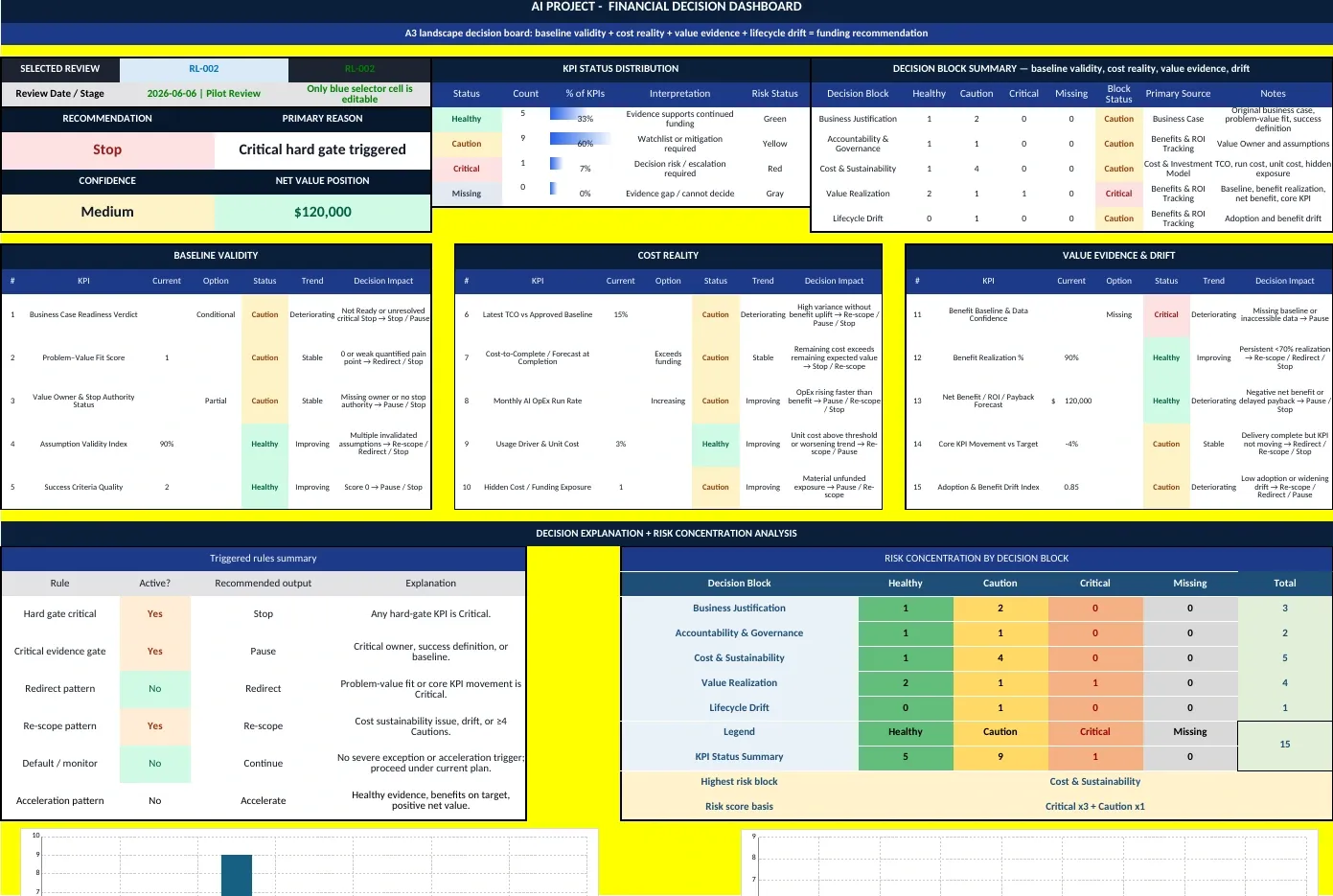
Figure 1. The lifecycle Dashboard brings together KPI status, decision blocks, confidence, and recommendation logic.
The principal investment-case data flow is:
Project_Inputs → Cost_Model_Template or Worked_Example_ChatGPT → ROI_Benefits → Start_Here
The principal lifecycle data flow is:
KPI Logs → KPIs Table and Logic Rules → Dashboard → Review Logs and Start_Here
The two engines meet at the front-page summary and within the review conversation. They do not automatically convert forecast data into actual evidence. Users must deliberately refresh assumptions and log actual observations.
6.4 Editable and controlled areas
The workbook identifies inputs, assumptions, cost lines, evidence fields, ownership fields, notes, and human decisions as editable. Formula outputs, decision-rule formulas, validation lists, and load-bearing helper sheets should be treated as controlled content. The Dashboard sheet is protected. Other Resource 08 worksheets and workbook structure remain intentionally unprotected in this release. The PMO should therefore restrict access, preserve a publication master, and use controlled file-level versioning.
7. Preparing to Use the Workbook
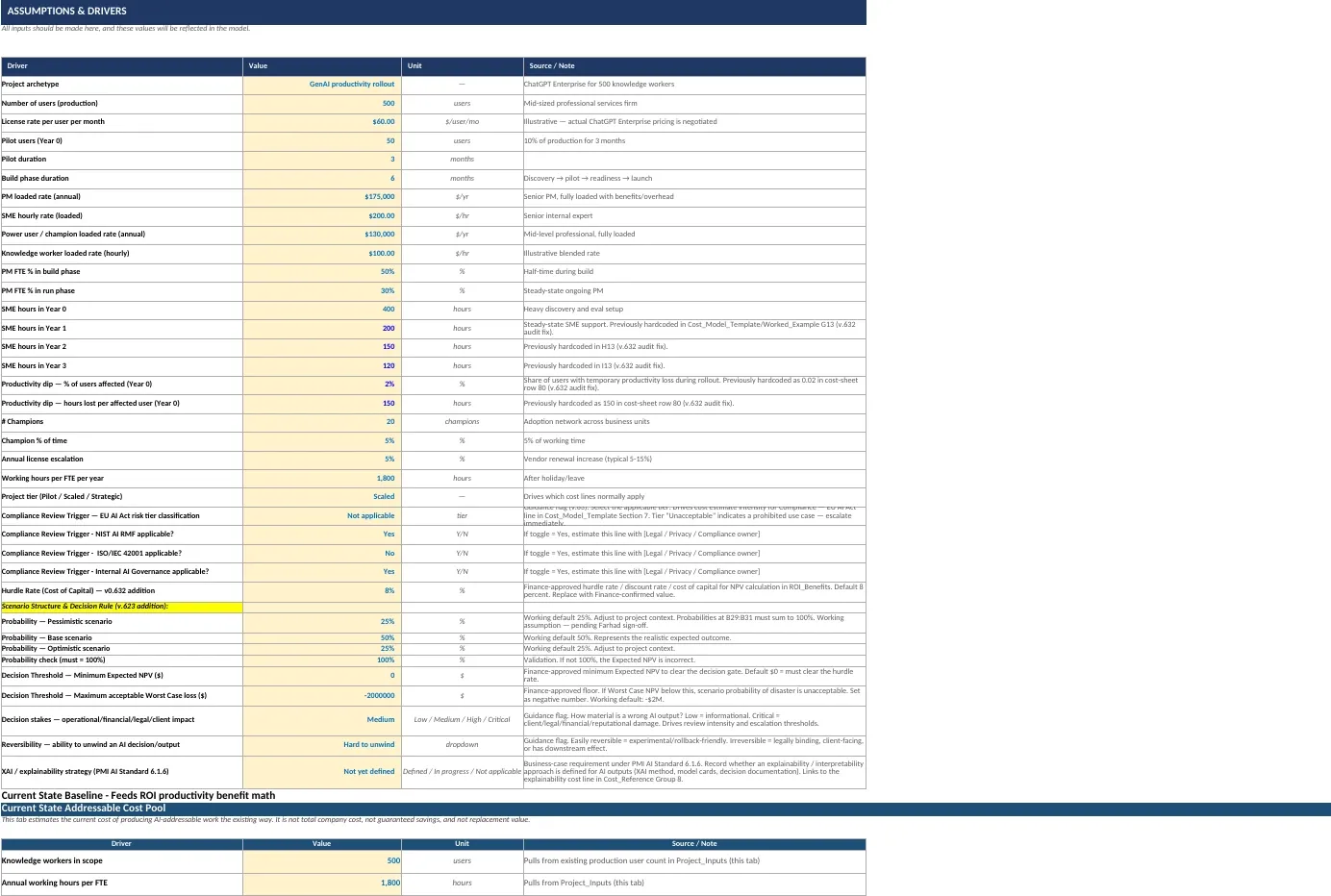
Figure 2. Project_Inputs centralizes assumptions, rates, scenario probabilities, and decision thresholds.
7.1 Create a controlled initiative copy
Keep the published workbook as an unedited master. Create a separately named, access-controlled copy for each initiative. A practical filename is:
[Initiative] - AI Investment Case and Lifecycle Decision Workbook - [Version] - [Date].xlsx
The current workbook should be treated as a single-initiative model. Do not combine evidence from multiple initiatives in one KPI Logs table.
7.2 Confirm compatibility
The workbook uses modern spreadsheet functions, including LET, XMATCH, and SWITCH. Use a current version of Microsoft Excel and confirm that formulas recalculate without errors. Test explicitly before using the workbook in older Excel versions or other spreadsheet applications.
7.3 Establish ownership and decision authority
Before entering assumptions, confirm:
- Who owns the intended business outcome?
- Who can authorize funding?
- Who can stop or pause the initiative?
- Who validates cost assumptions?
- Who validates benefit assumptions and actual benefit evidence?
- Which forum reviews material exceptions or overrides?
- What decision cadence and escalation triggers apply?
7.4 Define the decision in scope
State what decision the workbook is supporting. Examples include:
- Whether to fund a discovery or pilot
- Whether to move from pilot to scaled implementation
- Whether to approve go-live
- Whether to continue funding after a benefit review
- Whether to renew or renegotiate a vendor arrangement
- Whether to re-scope, redirect, or retire a capability
A model without a defined decision can accumulate detail without improving judgment.
7.5 Gather minimum source evidence
At minimum, prepare:
- Problem statement and intended organizational outcome
- Current-state process and performance baseline
- User and volume estimates
- Vendor, license, usage, and infrastructure assumptions
- Internal loaded rates or approved costing approach
- Data, integration, security, privacy, legal, and compliance requirements
- Delivery and operating resource assumptions
- Benefit hypotheses and measurement methods
- Adoption and process-change assumptions
- Approved hurdle rate and decision thresholds
- Feasibility evidence and unresolved gaps
- Named owners and source references
7.6 Remove or clearly identify example data
The workbook contains a worked ChatGPT Enterprise example and sample lifecycle review rows. Before using the workbook for an actual initiative:
- Decide whether the cost-source toggle will use the worked example or the project template.
- Replace project-input assumptions with initiative-specific values.
- Replace or remove sample KPI and Review Log entries in the controlled working copy.
- Confirm that the Dashboard selector points to the intended review.
- Label any values retained for demonstration as illustrative.
7.7 Agree model governance
The PMO or model owner should define:
- Who may edit assumptions and formulas
- How input changes are approved
- How versions are named and retained
- How evidence sources are referenced
- How formula changes are tested
- How decision snapshots are preserved
- How workbook access is controlled
- How confidential commercial, employee, client, or regulatory data is handled
8. Building the Investment Case: Detailed Workflow
8.1 Step 1 - Define the initiative and archetype
In Project_Inputs, define the project archetype, the users or operating units in scope, the expected production scale, the pilot scale, and the proposed delivery period. The archetype should describe the economic and operating pattern, not merely name a technology.
Examples include:
- Enterprise productivity rollout
- Retrieval-augmented knowledge assistant
- Predictive model supporting an operational decision
- AI-enabled customer-service workflow
- Agentic workflow with human approval
The archetype influences which cost lines apply, how benefits are measured, and how adoption and risk should be interpreted.
8.2 Step 2 - Confirm project tier and risk context
Select Pilot, Scaled, or Strategic and record:
- Compliance applicability
- Decision stakes
- Reversibility
- Explainability strategy
- Feasibility status and gaps
Project tier is a scoping aid, not a substitute for assessment. A Pilot may still require extensive privacy, security, legal, or evaluation work if it uses sensitive data or affects consequential decisions.
8.3 Step 3 - Validate rates and resource drivers
Replace illustrative values for:
- License rates and escalation
- PM, SME, employee, and champion rates
- Build and run resource levels
- SME hours
- Pilot and production user volumes
- Working hours
- Adoption support
- Productivity dip during transition
Each material value should have a source or note. If the organization uses standard Finance rates, identify the rate set and effective date. If a vendor price is indicative or negotiated, label its status.
8.4 Step 4 - Establish the current-state AI-addressable cost pool
The current-state baseline estimates the cost of producing potentially AI-addressable work under the existing approach. It includes areas such as drafting, lookup, summarization, SME bottlenecks, waiting time, tools, external services, rework, and onboarding.
This cost pool is not:
- Total organizational cost
- Guaranteed savings
- Replacement value
- A claim that all affected labor will be removed
Its purpose is to define the economic area within which measurable benefits may occur. The benefit model then applies specific improvement, adoption, ramp, decay, and conversion assumptions rather than treating the entire pool as avoided cost.
Opportunity cost is shown separately because it is not automatically a cash saving. Use it as supporting value unless Finance approves a different treatment.
8.5 Step 5 - Build the lifecycle cost estimate
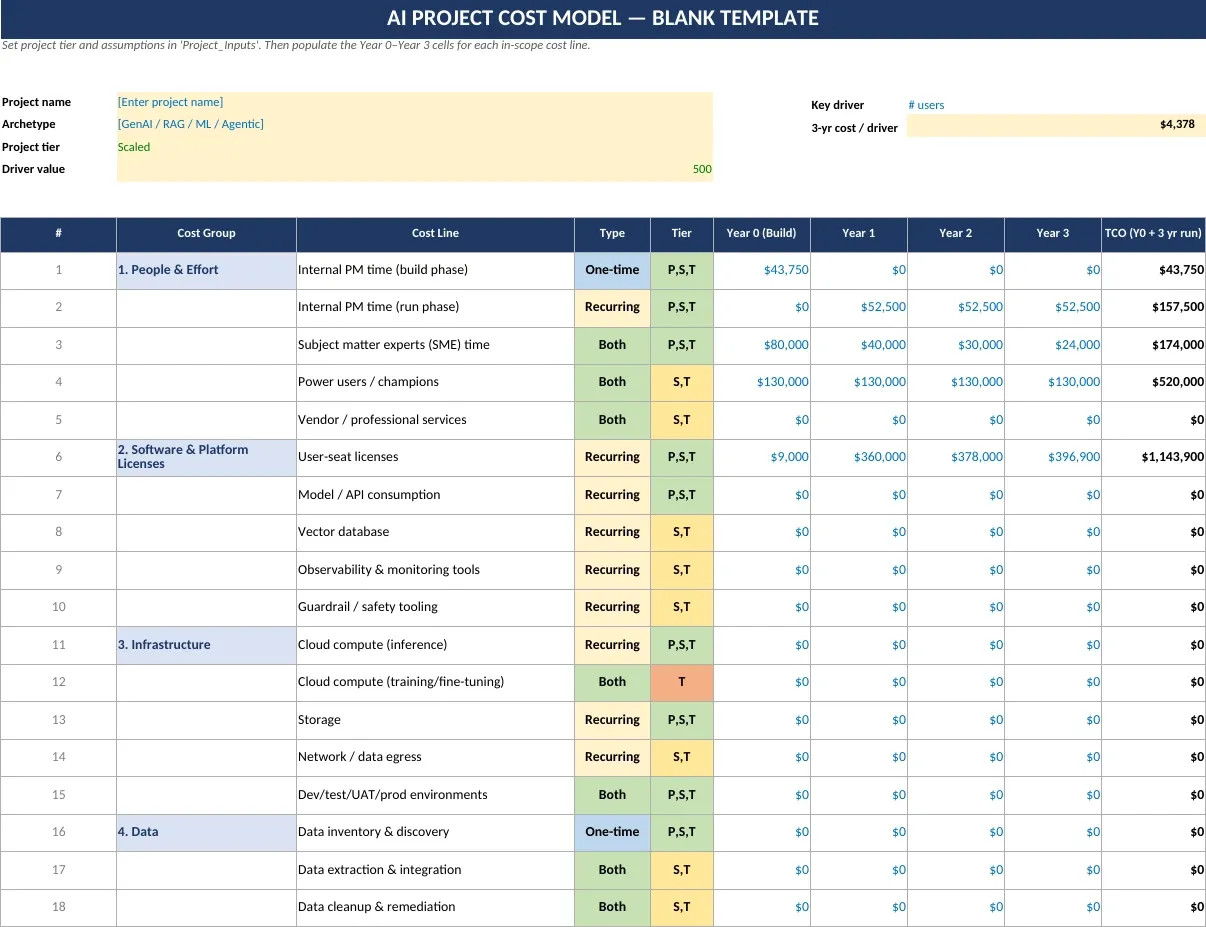
Figure 3. Cost_Model_Template structures Year 0 build and Years 1-3 operating cost by lifecycle cost group.
Use Cost_Model_Template for the initiative-specific estimate. Populate Year 0 build and Years 1-3 run cost for every applicable line. Review the full taxonomy in Cost_Reference, including the hidden-cost checklist.
For every material line, apply one of three outcomes:
- Included in the estimate
- Marked zero with a documented reason
- Captured as an assumption or unresolved exposure with an owner and review date
Do not assume that a zero in the template means the cost is not applicable. Many zeroes are placeholders.
8.6 Step 6 - Separate cost types
The workbook distinguishes:
- One-time build cost: discovery, setup, initial integration, initial evaluation, initial training, and similar items
- Recurring run cost: licenses, usage, monitoring, support, governance, human review, refresh, and similar items
- Both: activities that begin during build and continue in operation
This separation helps decision-makers see whether an apparently affordable implementation creates an unsustainable operating commitment.
8.7 Step 7 - Review the twelve cost groups
| Group | Questions to ask |
|---|---|
| People and Effort | Have PM, SME, champion, governance, and operational effort been costed rather than absorbed invisibly? |
| Software and Platform | Are license minimums, escalation, usage growth, APIs, observability, and safety tools included? |
| Infrastructure | Are training, inference, storage, egress, and non-production environments included? |
| Data | Are discovery, cleanup, integration, labeling, redaction, lineage, access, and process remediation included? |
| Build Activities | Are vendor selection, architecture, prompt assets, retrieval, interfaces, and customization included? |
| Evaluation and QA | Are answer keys, UAT, hallucination, bias, red-team, regression, and cost-at-scale testing included? |
| Security, Privacy and Compliance | Are architecture, privacy, contracts, applicable regimes, retention, disclosures, and testing included? |
| Governance and Risk | Are governance design, approval forums, audit evidence, third-party review, incidents, and explainability included? |
| Change and Adoption | Are communication, training, use-case discovery, process redesign, reskilling, and knowledge preservation included? |
| Operations and Maintenance | Are support, prompt/content refresh, drift monitoring, retraining, human review, and vendor management included? |
| Reserves and Contingencies | Are data, quality, security, usage, vendor, and adoption uncertainties reflected? |
| Opportunity and Exit | Are productivity dip, SME opportunity cost, vendor exit, rebuild, retraining, and planned transition considered? |
8.8 Step 8 - Test the non-AI alternative
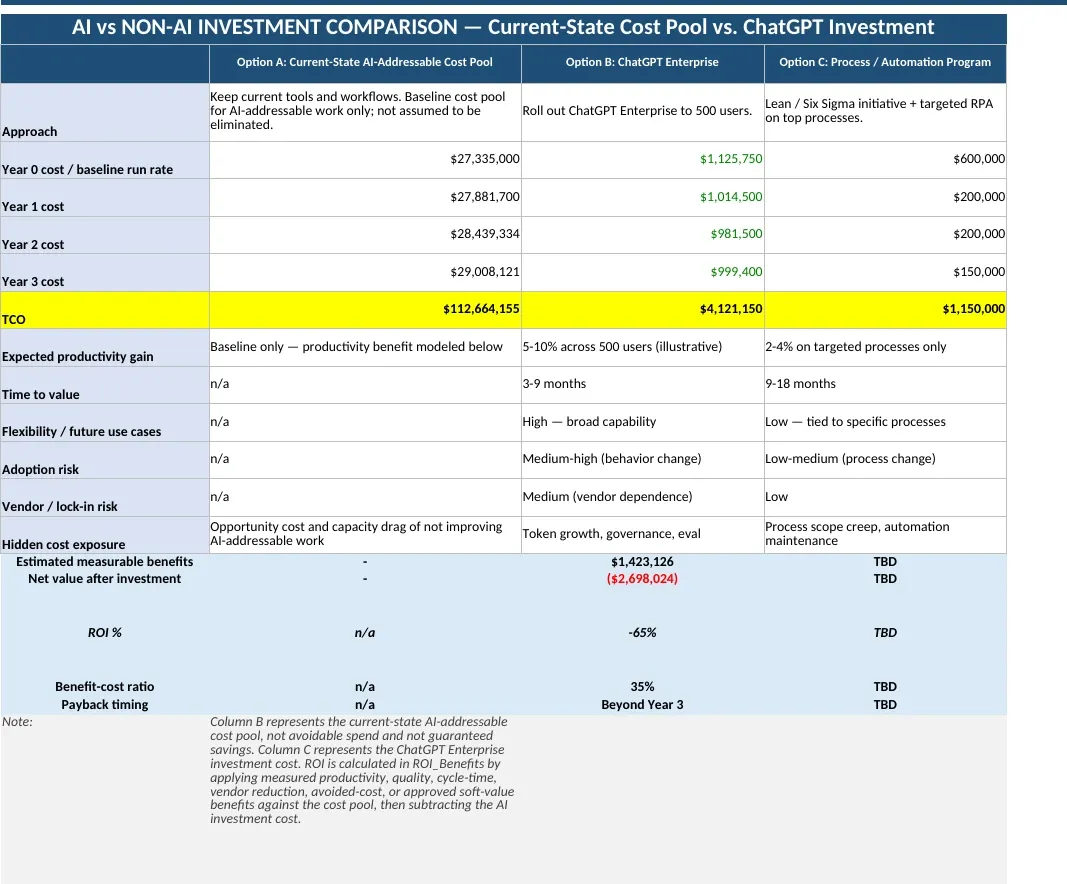
Figure 4. AI_vs_Non-AI_Comparison places the AI option alongside current state and a non-AI alternative.
Use AI_vs_Non-AI_Comparison to avoid treating AI as the default solution. Compare:
- Current state
- Proposed AI option
- A credible non-AI alternative, such as process redesign, conventional automation, revised controls, better search, or targeted system improvement
Compare cost, time to value, flexibility, adoption risk, vendor dependence, hidden-cost exposure, measurable benefits, net value, ROI, and payback. The current sheet includes illustrative worked-example values and TBD fields; tailor all relevant cells before using it as decision evidence.
8.9 Step 9 - Reconcile affordability and funding treatment
TCO is not the same as approved budget. Confirm:
- Which costs require new cash funding
- Which costs are internal effort
- Which costs are pass-through or client-funded
- Which costs are already approved
- Which costs are notional or opportunity costs
- Which costs remain uncertain or outside the current SOW
- Whether the operating budget can sustain Years 1-3
8.10 Step 10 - Apply cost controls
Cost_Controls provides a method for discussing cost-to-complete and illustrative variance bands:
- Green: up to 5 percent variance
- Yellow: more than 5 percent and up to 15 percent
- Red: more than 15 percent
These are illustrative defaults. Confirm organizational thresholds with Finance and the Sponsor. The sheet is guidance only; actuals, commitments, forecast-at-completion, and variance calculations must be maintained in an appropriate cost-control record or added through a governed enhancement.
9. Developing the Benefit Case
9.1 Begin with an outcome and baseline
Every benefit should connect to an intended organizational outcome and a measured or measurable baseline. A benefit statement should answer:
- What will improve?
- For whom?
- Compared with what baseline?
- By how much and by when?
- How will it be measured?
- Who owns the result?
- What other change is required for the benefit to occur?
Without a baseline and accessible data, realized ROI cannot be demonstrated.
9.2 Keep benefit types separate
| Benefit type | Meaning | Evidence expectation |
|---|---|---|
| Productivity / capacity value | Time or capacity released for other useful work | Time study, task sampling, workflow data, adoption data, and an agreed hours-to-value conversion |
| Quality / margin value | Reduced rework, defects, delays, or quality loss | Before-and-after quality measurement, review data, and a method preventing overlap with productivity |
| Hard-dollar benefit | Actual cost removed, contract reduced, spend avoided, or revenue realized | Finance-verifiable commitment, budget change, contract change, or recorded financial result |
| Avoided future investment | A planned and approved cost no longer required or materially reduced | Evidence of the approved alternative investment and Finance acceptance of the avoided amount |
| Soft or intangible value | Decision quality, trust, knowledge, resilience, or similar value represented through an accepted proxy | Documented proxy, evidence source, accountable owner, and explicit Finance acceptance before inclusion in ROI |
9.3 Prevent double counting
Common double-counting risks include:
- Counting the same saved hours as both productivity and hard-dollar reduction
- Counting lower rework in both quality and productivity
- Counting the full cost pool as savings and then adding productivity benefits
- Counting avoided headcount and released capacity simultaneously
- Counting soft-risk proxies and the related hard-dollar avoided loss without reconciliation
Each benefit should have a clear boundary and owner. Where two benefit categories overlap, use the more defensible treatment or document the reconciliation.
9.4 Apply realization drivers
The workbook applies four important realization drivers:
- Year 0 realization: recognizes that build and pilot periods provide only partial benefit
- Year 1 ramp: recognizes that adoption and workflow change take time
- Annual benefit decay: recognizes that value may erode without refresh, retraining, and operating discipline
- Active adoption: limits benefit to meaningful use
- Hours-to-value conversion: recognizes that time saved does not automatically become productive or financial value
These drivers should be evidence-based and owned. They are often more influential than the headline productivity percentage.
9.5 Use per-benefit certainty
The workbook provides Best, Base, and Worst certainty factors for each benefit row. This is preferable to applying one global confidence percentage because different benefit claims have different levels of evidence. A contract-backed tool reduction may have high certainty; an early productivity hypothesis may have much lower certainty.
9.6 Soft value
Soft value is switched off by default in the reviewed workbook. Include it only when:
- The value is relevant to the decision
- The proxy is clearly defined
- The evidence source is identified
- The accountable owner is named
- Double counting has been addressed
- Finance accepts its inclusion in the financial case
Soft value can still be reported qualitatively when it is not included in ROI.
9.7 Benefits-realization planning
The ROI_Benefits sheet includes a post-go-live tracking block for expected and realized values. At minimum, define:
- KPI
- Source driver
- Expected result
- Realized result by period
- Variance
- Accountable owner
- Reporting cadence
- Notes explaining major differences
The default reporting cadence shown in the workbook is quarterly, but the organization should select a cadence proportionate to the initiative and benefit profile.
10. Financial Metrics and Scenario Interpretation
10.1 Total cost of ownership
TCO includes Year 0 build plus Years 1-3 run cost. It should be read alongside the annual profile because two initiatives with the same TCO can create very different affordability, liquidity, and operating-budget implications.
10.2 Net value
Net value is:
Total measurable benefits - Total investment cost
A negative value indicates that modeled benefits do not recover modeled investment over the horizon. A positive value does not by itself establish feasibility, compliance, affordability, strategic fit, or authority to proceed.
10.3 Return on investment
The workbook calculates ROI as:
(Total measurable benefits - Total investment) / Total investment
Users should state the period, scenario, included benefit categories, and treatment of internal effort when communicating ROI.
10.4 Benefit-cost ratio
The benefit-cost ratio is:
Total measurable benefits / Total investment
A ratio above 1.0 indicates that modeled benefits exceed modeled cost over the period. A ratio below 1.0 indicates the opposite. The ratio should not be interpreted without the timing and risk of cash flows.
10.5 Payback and break-even
Payback identifies the first modeled year in which cumulative net value becomes non-negative. The reviewed workbook uses Year 0 through Year 3. “Beyond Year 3” means break-even was not achieved inside that horizon; it does not prove that break-even will occur later.
10.6 Net present value
NPV discounts future net cash flows using the hurdle rate recorded in Project_Inputs. The organization should replace the illustrative 8 percent rate with a Finance-approved rate or document why a different rate applies.
Positive NPV indicates that the modeled cash-flow case exceeds the applied hurdle rate. Negative NPV indicates that it does not. NPV is only as reliable as the cash-flow classification, timing, and assumptions supporting it.
10.7 Internal rate of return
IRR is the discount rate at which NPV equals zero. Compare it with the Finance-approved hurdle rate. IRR may be unavailable or misleading where cash flows do not produce a valid sign change or have unconventional patterns. In the worked example, IRR is shown as not available because the modeled net values remain negative.
10.8 Best, Base, and Worst scenarios
The workbook uses per-benefit certainty factors to produce:
- Best Case: higher benefit certainty
- Base Case: realistic central outcome
- Worst Case: lower benefit certainty and downside outcome
The labels describe modeled scenarios, not statistical guarantees. The scenario factors should be supported by evidence and reviewed when material assumptions change.
10.9 Probability-weighted Expected NPV
Expected NPV is calculated as:
P(Pessimistic) × Worst NPV + P(Base) × Base NPV + P(Optimistic) × Best NPV
The reviewed workbook uses illustrative probabilities of 25 percent, 50 percent, and 25 percent. The probability check must equal 100 percent. Replace the defaults where initiative evidence supports a different distribution.
Expected NPV is a decision aid, not a promise of expected financial return. It compresses three scenarios into one value and should always be presented with the scenario range and downside.
10.10 Decision thresholds
The workbook contains:
- Minimum acceptable Expected NPV
- Maximum acceptable Worst-Case loss
- Hurdle rate
- Base-Case NPV test
- Worst-Case payback test
These thresholds should be approved by Finance and the relevant authority. They should not be changed merely to make a proposal pass.
10.11 Sensitivity analysis
The workbook recommends changing one driver at a time, observing the effect on total benefits and ROI, and then restoring the baseline value. Prioritize:
- Productivity gain
- Active adoption
- Hours-to-value conversion
- Benefit certainty
- License or usage cost
- Build effort
- Run cost
- Annual decay
- Time to value
- Hurdle rate
Record the drivers to which the decision is most sensitive. These become monitoring priorities and potential invalidation conditions.
11. Interpreting the Business-Case Recommendation
11.1 Proceed
The workbook’s intended Proceed condition requires the modeled case to clear the minimum Expected NPV, maintain a non-negative Base-Case NPV, achieve Worst-Case payback within the modeled horizon, and remain above the accepted Worst-Case loss floor.
Before authorization, confirm that:
- Feasibility is established
- Critical risks and regulatory constraints are acceptable
- Funding is available
- Benefit and cost owners accept their assumptions
- Measurement and governance controls are in place
- The decision authority has reviewed the downside
11.2 Proceed with Controls
This recommendation means that the principal Expected NPV and downside conditions pass, but the case does not meet every condition required for an unqualified Proceed recommendation. Controls should be specific and decision-relevant, for example:
- Limit initial scale
- Require a baseline before the next release
- Cap license or usage expenditure
- Complete a security or privacy action before go-live
- Establish a minimum adoption threshold
- Require contract-backed savings evidence
- Set a short review interval
- Define a stop condition
11.3 Rework / Defer
Rework / Defer means that the current case should not be approved as presented. Appropriate responses include:
- Reduce or stage scope
- Reassess the non-AI alternative
- Correct missing cost lines
- Strengthen benefit evidence
- Establish a baseline
- Revise adoption or process-change assumptions
- Negotiate commercial terms
- Resolve feasibility gaps
- Delay the request until material uncertainty is reduced
Rework is not approval to begin additional work unless that work is separately authorized.
11.4 Do Not Proceed
Do Not Proceed indicates unacceptable downside in the circumstances defined by the decision rule. The human authority should record whether the initiative is rejected, retired, redirected, or returned for a fundamentally different proposition. Safe closure, contractual, data-retention, employee, client, and regulatory obligations may still require action and funding.
11.5 Human sign-off
The ROI_Benefits sheet provides fields for reviewer, decision, override or deviation rationale, and date. Complete them for every formal investment decision. If the organizational approval record is held in another system, reference that record from the workbook.
12. Lifecycle Evidence Workflow
12.1 Purpose of the KPI log
KPI Logs is the primary lifecycle evidence-entry sheet. Each row represents one review point and contains the selected or measured value for fifteen KPIs. The Dashboard reads a selected Review ID, calculates status and trend, and applies the decision hierarchy.
12.2 Before each review
The PM should coordinate an evidence pack containing:
- Latest approved baseline and forecast
- Actual and committed cost
- Forecast-at-completion or cost-to-complete assessment
- Current run rate and unit economics
- Benefit baseline and realized results
- Core KPI performance
- Adoption and use evidence
- Assumption-validity review
- Open hidden-cost or funding exposures
- Decision-owner and stop-authority status
- Material changes in technical, vendor, regulatory, security, privacy, or operating context
12.3 Enter one chronological review row
For each review:
- Create a unique Review ID.
- Enter the review date.
- Select the lifecycle stage or gate.
- Enter values or approved options for all fifteen KPIs.
- Do not substitute a favorable assumption for missing evidence.
- Append the row chronologically; do not insert it above later reviews without checking trend logic.
- Retain the evidence pack or source references supporting the row.
The current Dashboard treats the last populated row as the latest review, rather than selecting the maximum date. Chronological, append-only entry is therefore an operating requirement.
12.4 Select the review
On the Dashboard, select the intended Review ID or Latest Review. Confirm that the displayed review date and stage match the intended evidence row before interpreting the recommendation.
12.5 Review KPI status and trend
The Dashboard groups the fifteen KPIs into baseline validity, cost reality, value evidence, and lifecycle drift. Review:
- Current value or option
- Status: Healthy, Caution, Critical, or Missing
- Trend: Improving, Deteriorating, Stable, or No prior reading
- Decision effect
- Concentration of risk by decision block
A recommendation should never be reviewed without the underlying KPI distribution and the source evidence.
13. Lifecycle KPI Framework
13.1 Status thresholds
The current workbook applies the following thresholds:
| # | KPI | Healthy | Caution | Critical | Hard gate |
|---|---|---|---|---|---|
| 1 | Business Case Readiness Verdict | Ready | Conditional | Not Ready | Yes |
| 2 | Problem-Value Fit Score | 2 | 1 | 0 | Yes |
| 3 | Value Owner and Stop Authority Status | Confirmed | Partial | Missing | Yes |
| 4 | Assumption Validity Index | At least 80% | 60-79% | Below 60% | No |
| 5 | Success Criteria Quality | 2 | 1 | 0 | Yes |
| 6 | Latest TCO vs Approved Baseline | Absolute variance up to 10% | Above 10% and up to 25% | Above 25% | No |
| 7 | Cost-to-Complete / Forecast at Completion | Within approved funding | Exceeds funding | Unfunded gap | No |
| 8 | Monthly AI OpEx Run Rate | Stable | Increasing | Above cap | No |
| 9 | Usage Driver and Unit Cost | Absolute variance up to 10% | Above 10% and up to 25% | Above 25% | No |
| 10 | Hidden Cost / Funding Exposure | 0 | 1-3 | More than 3 | No |
| 11 | Benefit Baseline and Data Confidence | Confirmed | Partial | Missing | Yes |
| 12 | Benefit Realization | At least 90% | 70-89% | Below 70% | No |
| 13 | Net Benefit / ROI / Payback Forecast | Positive | Breakeven | Negative | No |
| 14 | Core KPI Movement vs Target | At or above target | Up to 10% below target | More than 10% below target | No |
| 15 | Adoption and Benefit Drift Index | At least 90% | 70-89% | Below 70% | No |
The thresholds are model defaults. Any organizational change to them should be governed, documented, tested, and reflected consistently in the KPI table, logic documentation, and Dashboard formulas.
13.2 Decision blocks
Business Justification
Tests whether the initiative still solves a defined business problem, has defensible success criteria, and remains ready for commitment. A technically successful initiative can still fail this block if the business case has become invalid.
Accountability and Governance
Tests whether a Value Owner and stop authority exist and whether the original assumptions remain sufficiently valid. Weak ownership is not a documentation inconvenience; it is a decision risk.
Cost and Sustainability
Tests whether TCO, remaining funding, operating run rate, unit economics, and hidden exposure remain acceptable. It prevents the organization from reviewing cost only at approval.
Value Realization
Tests whether the baseline exists, benefits are being realized, the financial position remains defensible, and the core business KPI is moving.
Lifecycle Drift
Tests whether adoption and realized value are drifting away from the approved promise. Drift may require process redesign, retraining, scope change, or a different value pathway rather than additional technology alone.
13.3 Missing evidence
Missing evidence should remain visible as missing. It should not be converted automatically into a favorable status. The review authority should decide whether the missing evidence prevents a decision, requires a pause, or can be accepted temporarily with a named owner and due date.
14. Reading the Lifecycle Dashboard
14.1 Selected review
Confirm the Review ID, review date, and stage. The current sample workbook is set to an illustrative review rather than Latest Review; change the selector deliberately.
14.2 Recommendation and primary reason
The headline recommendation is produced by the decision hierarchy. The primary reason summarizes the highest-priority condition. Read it alongside the triggered-rule section because more than one rule may be active.
14.3 Confidence
The Dashboard displays High, Medium, or Low confidence based on the confidence values held in the KPI backbone. In the current release, these confidence values are not entered separately for each review. Treat the displayed confidence as a model indication, not a complete evidence-quality assessment. The review group should explicitly discuss source quality, recency, completeness, and independence.
14.4 Net value position
The Dashboard net-value position is a logged lifecycle evidence value from the KPI record. It is intentionally different from the forecast values shown in ROI_Benefits. Do not reconcile them by assuming one is wrong. Instead ask:
- Is the lifecycle value actual, forecast, or a blended forecast-at-completion?
- Is it measured over the same period as the investment case?
- Are the benefit and cost definitions consistent?
- Has the approved case been refreshed?
14.5 KPI status distribution
Review the number and percentage of Healthy, Caution, Critical, and Missing KPIs. A headline recommendation can conceal concentrated weakness. For example, a small number of hard-gate Criticals may outweigh many Healthy readings.
14.6 Risk concentration
The Dashboard shows the distribution of risk by decision block and identifies the highest-risk block using a score based on Critical and Caution counts. Use this to focus management action, not to replace judgment about the materiality of individual issues.
14.7 Trends
Trend compares the selected review with the prior populated row. It indicates direction, but not the size, duration, or cause of change. Because the current workbook is designed for one initiative, do not interleave multiple initiatives in the same log.
14.8 Triggered rules
The Dashboard displays whether the hard-gate, evidence, redirect, re-scope, default, and acceleration patterns are active. Review all active rules and document which condition the human decision addresses. Section 18 identifies current formula-precedence issues that should be considered when interpreting Pause and Redirect.
15. Human Decisions, Overrides, and Action Records
15.1 The human decision record
After reviewing the evidence and workbook recommendation, record:
- Human decision
- Whether it aligns with or overrides the recommendation
- Decision Owner
- Rationale
- Required actions or controls
- Action owner
- Due date
- Next review date
- Status
- Evidence snapshot or reference
- Person recording the decision
15.2 When the decision aligns
Alignment should still be explained briefly. Record the principal evidence, conditions, and follow-up. “Agreed with the model” is not sufficient where the decision commits material resources or affects stakeholders.
15.3 When the decision overrides
An override may be appropriate where the model does not capture a material consideration, evidence has changed after the data cutoff, an urgent regulatory or operational obligation applies, or the authority accepts a specific risk within its mandate.
An override should state:
- The workbook recommendation
- The authorized decision
- The evidence or consideration supporting the difference
- The risk accepted
- Required mitigation
- Named owner and due date
- Conditions that would reverse the override
- Next review date
An override should not be used to avoid correcting weak evidence or unfavorable economics.
15.4 Static evidence snapshot
In the current release, Review Log recommendation, confidence, rationale, and evidence-summary fields are append-only static values. At each formal gate, populate the row from the approved Dashboard state and retain the supporting evidence and accountable human decision.
- Export the Dashboard and decision record to PDF
- Paste the recommendation and evidence summary as values into an approved decision record
- Store a versioned copy of the workbook at the decision date
- Reference an approved governance-system record containing the snapshot
Do not overwrite prior Review Log rows; retain each formal gate as a static historical record.
15.5 Closing actions
A decision is not complete when the meeting ends. Review open actions, confirm owners have accepted them, and track completion before the next gate. Where a control is a condition of proceeding, funding or release should not advance until the authority confirms that the condition has been met or formally waived.
16. Review Cadence across the Lifecycle
| Review point | Typical timing | Primary workbook activity | Expected decision output |
|---|---|---|---|
| Idea screening | Before material spend | Define problem, users, drivers, and alternatives | Worth developing, redirect, or stop screening |
| Business-case approval | Funding request | Complete cost, benefit, scenarios, feasibility, and thresholds | Proceed, Proceed with Controls, Rework / Defer, or Do Not Proceed |
| Proof-of-concept or pilot gate | Before moving to the next stage | Update assumptions; log KPI evidence; review cost and learning | Stop, Pause, Redirect, Re-scope, Continue, or Accelerate |
| Active delivery | Monthly and at each material gate | Review actual/committed cost, forecast, assumptions, and evidence | Continue, control, re-scope, pause, or stop |
| Go-live | Before operational launch | Confirm baseline, data, ownership, operating cost, controls, support, and KPI readiness | Authorized go-live, conditional go-live, pause, or stop |
| 30-day review | 30 days after launch | Log adoption, early quality, incidents, cost, and baseline evidence | Continue, re-scope, redirect, pause, or stop |
| 60-day review | 60 days after launch | Review adoption and early benefit realization | Continue, re-scope, redirect, or accelerate cautiously |
| 90-day review | 90 days after launch | Compare realized benefits and operating cost with approved case | Continue, re-scope, redirect, accelerate, or stop |
| Quarterly value review | During operation | Refresh benefits, cost, drift, assumptions, and risks | Ongoing funding and control decision |
| Six-month review | Where material | Reassess value pathway and operating sustainability | Continue, re-scope, renegotiate, or retire |
| Annual re-buy / renewal | Before contract or budget renewal | Refresh TCO, scenarios, actual evidence, alternative options, and exit cost | Renew, renegotiate, re-scope, replace, or retire |
| Event-triggered review | After material incident, variance, model/vendor change, regulatory change, or assumption failure | Update affected evidence immediately | Escalation and accountable intervention |
Cadence should be proportionate. High-stakes, irreversible, fast-changing, or weak-evidence initiatives require shorter review intervals.
17. Illustrative Worked Example
17.1 Purpose of the example
The workbook contains an illustrative ChatGPT Enterprise rollout for 500 knowledge workers. Its purpose is to demonstrate how cost categories, benefits, scenarios, and recommendations interact. It is not a recommended architecture, price benchmark, return expectation, or generic business case for enterprise generative AI.
17.2 Illustrative investment-case outputs
The reviewed workbook shows approximately:
| Metric | Illustrative result |
|---|---|
| Three-year total investment | $4,121,150 |
| Total measurable benefits - main summary using Best-Case certainty | $1,423,126 |
| Net value - main summary using Best-Case certainty | ($2,698,024) |
| ROI - main summary using Best-Case certainty | -65.5% |
| Benefit-cost ratio - main summary using Best-Case certainty | 0.35x |
| Payback - main summary using Best-Case certainty | Beyond Year 3 |
| Base-Case NPV | ($2,771,817) |
| Probability-weighted Expected NPV | ($2,771,817) |
| Business-case recommendation | Rework / Defer |
The result indicates that the modeled benefits do not recover the modeled investment within the horizon and the Base-Case and Expected NPV do not clear the illustrative threshold. The appropriate interpretation is not that enterprise generative AI is generally uneconomic. It is that this particular illustrative combination of scope, cost, benefit assumptions, adoption, conversion, and horizon does not support approval as modeled.
17.3 What a practitioner should investigate
The result should prompt questions such as:
- Are the use cases sufficiently specific and valuable?
- Are the benefit assumptions supported by task-level evidence?
- Is active adoption realistic?
- Can released capacity produce measurable value?
- Are all cost lines necessary for this scope?
- Can the initiative be phased around higher-value users or workflows?
- Can commercial terms be improved?
- Is the non-AI alternative more attractive?
- Is the modeled horizon appropriate?
- Are there hard-dollar, quality, or avoided-cost benefits supported by evidence but not yet included?
The objective is not to manipulate assumptions until the model passes. It is to improve the proposition or decide not to proceed.
17.4 Illustrative lifecycle reading
The sample lifecycle review RL-002 shows:
- Recommendation: Stop
- Confidence: Medium
- Primary reason: Critical hard gate triggered
- KPI distribution: 5 Healthy, 9 Caution, and 1 Critical
- Critical issue: missing benefit baseline and data confidence
- Logged human decision: Re-scope, recorded as a Human Override
This illustrates why the headline count is not enough. Although only one KPI is Critical, it is a hard-gate KPI. It also illustrates Human-in-Command: the human decision differs from the formula-driven recommendation and should therefore be supported by a clear rationale, risk acceptance, mitigation, owner, and next review.
The sample investment-case figures and lifecycle evidence are demonstration data. They should not be assumed to represent the same real initiative state, and neither set should be treated as a benchmark.
17.5 Scenario-label caution
In the current workbook, the front-page total benefits, net value, ROI, benefit-cost ratio, and payback are drawn from the main ROI summary, which uses Best-Case certainty factors, while Base-Case and Expected NPV are shown separately. The front page does not clearly label the first group as Best Case. Users should label the scenario explicitly in presentations and apply the interim control in Section 18 until the workbook is corrected.
18. Governance, Data Quality, Operating Controls, and Known Limitations
18.1 Essential operating controls
| Control area | Required practice |
|---|---|
| Master template | Retain an unedited master and create one controlled copy per initiative |
| Access | Limit formula and helper-sheet editing to the model owner or PMO |
| Sources | Record source, owner, date, and status for material assumptions and evidence |
| Finance validation | Approve rates, cost treatment, scenario probabilities, hurdle rate, and thresholds |
| Zero-cost lines | Require a documented rationale, assumption, or exposure owner |
| Benefit claims | Separate hard-dollar, capacity, quality, avoided cost, and soft value |
| Baseline | Do not claim realized value without a credible before-state and accessible data |
| Review IDs | Use unique IDs and append evidence chronologically |
| Decision snapshots | Preserve a static record for each formal gate |
| Overrides | Record rationale, accepted risk, mitigation, owner, due date, and reversal condition |
| Versioning | Retain the version used for each formal decision |
| Formula changes | Test and approve any change to thresholds, rules, named ranges, or helper sheets |
| Confidentiality | Apply organizational controls to commercial, employee, client, and regulated data |
18.2 Data-quality questions
Before accepting an input or KPI reading, ask:
- Is the definition clear and consistent with the approved case?
- Is the source authoritative?
- Is the value current enough for this decision?
- Is the period consistent with the model?
- Is the value actual, forecast, committed, sampled, or assumed?
- Has it been independently reviewed where material?
- Is missing or uncertain information visible?
- Can another reviewer reproduce the result?
18.3 Current-release limitations and interim controls
| Issue | Decision risk | Interim control | Recommended model correction |
|---|---|---|---|
| [Open] Front-page scenario mix | Best-Case ROI metrics appear beside Base and Expected NPV without a clear Best-Case label | Label every metric with its scenario in decision papers and verify the source row | Relabel the snapshot or change it to a consistent Base-Case summary |
| [Open — pending native Excel validation] Pause formula precedence | The Pause trigger uses KPIs that are also hard gates; the earlier Stop rule therefore captures them first | Review Logic Rules and the underlying KPI rather than relying only on the headline; human authority records the intended response | Reconcile hard-gate priority and Pause logic, then regression-test all six outputs |
| [Open — pending native Excel validation] Problem-value Redirect precedence | Critical problem-value fit is documented as Redirect but is caught by the earlier hard-gate Stop rule | Treat the formula output as a recommendation and document whether Stop or Redirect is the authorized response | Align the rule description, hard-gate designation, and formula precedence |
| [Closed] Append-only Review Log outputs | Historical recommendation, confidence, rationale, and evidence summaries are stored as static values at each formal gate | Append the approved values to a new Review Log row and retain a versioned workbook at every gate | Implemented: Review Log outputs are stored as values and mapped row-for-row to their Review ID |
| [Closed] Review Log mapping includes RL-004 | The RL-004 KPI row is represented in the corrected Review Log mapping | Verify each appended review and its source Review ID during gate review | Implemented: mapping corrected for the published log range |
| [Partially resolved] Latest Review uses the last populated row | Out-of-order entries can cause the wrong review to be treated as latest | Append chronologically and validate selected date/stage | Select latest by date with a unique-ID control |
| [Closed] Selector defaults to Latest Review | Start_Here displays the selected review recommendation, and the release selector defaults to Latest Review | Confirm the Latest Review date and stage before each formal gate | Implemented: Latest Review is the release default and Start_Here is labelled Selected review recommendation |
| [Deferred] Cost Controls remains guidance, not a calculation engine | Users may believe cost-to-complete and variance are calculated automatically | Maintain actuals, commitments, forecast-at-completion, and variance in an approved control record | Add a governed actual-versus-baseline and cost-to-complete module if required |
| [Partially resolved] AI option follows the selected cost source; the non-AI option remains user-entered | The AI option follows the selected project cost source; non-AI values remain editable assumptions | Validate the selected AI source and replace the illustrative non-AI values for the current case | Partially implemented: AI-source linkage is complete; alternative-case fields remain user inputs |
| [Deferred — intentional design] Single-initiative scope | Interleaved projects would distort latest review, trend, and decision evidence | Use one controlled workbook per initiative | Add initiative keys and project-specific lookup logic only through a tested redesign |
| [Closed] Confidence is stored per Review Log record | Confidence is copied as a static value for each formal Review Log record | Review and confirm the confidence value before appending the formal gate record | Implemented through the static Review Log confidence field |
| [Deferred — approved current design] Protection scope | Dashboard is protected; other worksheets and workbook structure remain intentionally unprotected | Restrict access, preserve a publication master, and use controlled file-level versioning | Deferred by approval; no broader Resource 08 protection was added |
| [Open — pending native Excel validation] Modern-function compatibility | Older software may fail to calculate or display formulas correctly | Use current Excel and complete a formula-error check before decision use | Publish supported-version requirements and a compatibility-tested release |
| [Closed] Workbook build label aligned to 1.2 | The current integrated workbook is identified as build 1.2 | Identify the approved workbook by filename, build 1.2, and release date | Implemented: front-page build label and public properties are aligned |
| [Closed] Hidden-tab list includes Sources | The hidden-sheet list includes all seven hidden calculation/reference sheets, including Sources | Sources remains a retained hidden reference sheet | Implemented: Sources added to the Start_Here hidden-sheet list |
| [Closed] Enhancement statuses reconciled | Change-log statuses now distinguish verified changes from pending native Excel validation | Use the recorded verification status and date for the current release | Implemented for ENH-009 through ENH-022; native Excel release validation remains pending |
18.4 Model-change governance
Any change to the following should be treated as a model change rather than an ordinary project input:
- KPI definitions or hard-gate designations
- Status thresholds
- Decision-rule sequence
- Scenario formulas
- Benefit calculation method
- Cost taxonomy structure
- Named ranges and data validations
- Dashboard formulas
- Review Log mapping
- Hidden helper-sheet formulas
Model changes should be documented, peer-reviewed, tested across positive, negative, missing-data, and boundary cases, and released under a new controlled version.
18.5 Evidence retention
Retain enough information to reconstruct the decision:
- Workbook version
- Input and evidence sources
- Review date and data cutoff
- Dashboard snapshot
- Recommendation
- Human decision and authority
- Rationale and override, if any
- Conditions and actions
- Completion evidence
- Next review date
19. Quick-Reference Checklists
19.1 Before first use
- [ ] Create a controlled copy for one initiative.
- [ ] Confirm current Excel compatibility and successful recalculation.
- [ ] Remove or identify sample data.
- [ ] Name the Sponsor, Value Owner, PM, Finance Partner, and evidence owners.
- [ ] Define the decision and delegated authority.
- [ ] Confirm version-control and access arrangements.
- [ ] Gather baseline, cost, benefit, feasibility, and risk evidence.
19.2 Before requesting funding
- [ ] Problem and intended outcome are clear.
- [ ] Resource 06 health check and Resource 07 readiness assessment have been considered.
- [ ] Feasibility is confirmed or gaps are visible.
- [ ] All material lifecycle cost groups have been reviewed.
- [ ] Every material zero has a rationale or owner.
- [ ] Current-state cost pool is not presented as guaranteed savings.
- [ ] Benefits are separated by type and have measurement owners.
- [ ] Adoption, ramp, decay, and hours-to-value are evidence-based.
- [ ] Best, Base, and Worst certainties are reviewed.
- [ ] Probabilities total 100 percent.
- [ ] Hurdle rate and thresholds are Finance-approved.
- [ ] Non-AI alternative is credible and complete.
- [ ] Scenario and sensitivity results are understood.
- [ ] Recommendation is clearly distinguished from authorization.
- [ ] Human sign-off and conditions are recorded.
19.3 Before each lifecycle review
- [ ] Review ID is unique.
- [ ] Review date and stage are correct.
- [ ] Evidence is current, sourced, and comparable with the approved case.
- [ ] Actual and forecast cost are distinguished.
- [ ] Benefit baseline and actual results are available.
- [ ] Assumptions have been revalidated.
- [ ] Adoption and core KPI movement are measured.
- [ ] Hidden-cost and funding exposure are updated.
- [ ] All fifteen KPI fields are completed or intentionally shown as missing.
- [ ] The evidence row is appended chronologically.
- [ ] Dashboard selector matches the intended review.
- [ ] Recommendation, primary reason, distribution, trends, and risk concentration are reviewed together.
- [ ] Known formula-precedence limitations are considered.
- [ ] Human decision, rationale, actions, owners, and next review are recorded.
- [ ] A static snapshot is retained.
19.4 Before go-live
- [ ] Benefit baseline and measurement access are confirmed.
- [ ] Value Owner and stop authority are confirmed.
- [ ] Operating budget and cost-to-complete are acceptable.
- [ ] Support, monitoring, human review, refresh, and incident costs are funded.
- [ ] Security, privacy, legal, compliance, and governance conditions are closed or formally accepted.
- [ ] Adoption, training, and process redesign are ready.
- [ ] Success criteria and stop conditions are explicit.
- [ ] Go-live authorization is documented separately from the workbook recommendation.
19.5 Before renewal or re-buy
- [ ] Actual cost and benefit evidence replace outdated forecasts where available.
- [ ] Vendor pricing, usage pattern, and unit economics are refreshed.
- [ ] Alternative vendors and non-AI options are reconsidered.
- [ ] Switching, retraining, data export, decommissioning, and transition costs are included.
- [ ] Benefit and adoption drift are reviewed.
- [ ] The initiative still supports the intended organizational outcome.
- [ ] Renew, renegotiate, re-scope, replace, or retire is explicitly decided.
20. Common Misuses to Avoid
- Treating the recommendation as automatic approval
- Using the worked example as a pricing or ROI benchmark
- Presenting the entire current-state cost pool as savings
- Counting saved time as cash without an agreed conversion mechanism
- Adding soft value to ROI without Finance acceptance
- Omitting internal, governance, human-review, monitoring, retraining, and exit costs
- Changing probabilities or thresholds to achieve a desired answer
- Mixing Best-Case ROI with Base-Case NPV without labeling scenarios
- Entering multiple initiatives in the same KPI log
- Backfilling favorable evidence while leaving unfavorable evidence undocumented
- Overwriting formula cells or hidden helper sheets
- Using a dynamic Review Log as the only historical record
- Ignoring the non-AI alternative
- Continuing because of sunk cost rather than remaining value
- Treating missing baseline data as a minor documentation issue
- Accelerating based on adoption alone without cost, benefit, and control evidence
21. Glossary
| Term | Meaning in this resource |
|---|---|
| AI-addressable cost pool | Current-state cost associated with work AI may influence; not guaranteed savings |
| Benefit-cost ratio | Total measurable benefits divided by total investment |
| Capacity value | Economic value of time or capacity released, which may not be a cash saving |
| Decision Owner | Person or forum with authority to authorize the decision |
| Expected NPV | Probability-weighted NPV across Pessimistic, Base, and Optimistic scenarios |
| Forecast | Forward-looking estimate based on assumptions |
| Hard gate | KPI condition designated as sufficiently material to drive the highest-priority response under the model logic |
| Hours-to-value conversion | Share of saved hours that can create usable economic or operational value |
| Human override | Authorized decision differing from the workbook recommendation, supported by rationale and controls |
| Lifecycle drift | Movement of adoption or realized value away from the approved case |
| Net value | Measurable benefits minus investment cost |
| NPV | Present value of modeled net cash flows discounted at the applied hurdle rate |
| Payback | First modeled period in which cumulative net value becomes non-negative |
| Recommendation | Formula-driven decision support output; not authorization |
| Realized benefit | Benefit supported by post-implementation evidence |
| TCO | Year 0 build plus Years 1-3 run cost in the workbook horizon |
| Value Owner | Accountable owner of the business outcome and benefit case |
22. Related Resources
Use this guide with:
- 00 - AIPM Toolkit - Practitioner Guide
- 01 - AIPM Toolkit - Core White Paper - Ontology, Taxonomy and Value Delivery
- 02 - AIPM Toolkit - Governance Operating Model
- 03 - AIPM Toolkit - Practical Application Guide
- 04 - AIPM Toolkit - Governance Intelligence and Semantic PMO Roadmap
- 05 - AIPM Toolkit - Reference Assets and Implementation Templates
- 06 - AIPM Toolkit - AI Project Business Case Quick Health Checklist
- 07 - AIPM Toolkit - AI Project Pre-Commitment Readiness Scoring Grid
- 08 - AIPM Toolkit - AI Investment Case and Lifecycle Decision Workbook.xlsx
- 09 - AIPM Toolkit - AI Investment Case and Lifecycle Decision Workbook - Change Log and Build Summary
- The AIPM Toolkit PRIISM financial-authority resource
- 11 - AIPM Toolkit - Benefits ROI Tracking and Agent
The complete resource set and current licensing terms should be confirmed in Resource 00.
23. Licensing and Disclaimer
23.1 Licensing notice
© 2026 the applicable author(s) and contributors identified in this document.
Text is licensed under **Creative Commons Attribution-**ShareAlike 4.0 International (CC BY-SA 4.0): attribution is required, changes must be identified, and adaptations must be distributed under the same license. Proprietary frameworks, methodologies, tools, terminology, and know-how are excluded.
This document is part of the AIPM Toolkit. Refer to Section 12 of 00 - AIPM Toolkit - Practitioner Guide for the complete licensing terms and disclaimer, and Section 3 for the current component set.
23.2 Disclaimer
This guide and its companion workbook are thinking, planning, and decision-support tools. They do not constitute financial, investment, accounting, tax, legal, regulatory, procurement, security, privacy, technical, engineering, employment, or other professional advice. They are not substitutes for organizational policy, delegated authority, independent assurance, due diligence, or advice from appropriately qualified professionals.
The contributors have sought to make the material accurate and useful, but no guarantee is made that the workbook, formulas, thresholds, examples, recommendations, or guidance are complete, error-free, suitable for every jurisdiction, suitable for every organization, or appropriate for a particular decision. AI technologies, costs, regulations, risks, vendor terms, and organizational conditions change over time.
Users are responsible for:
- Validating all assumptions, formulas, evidence, and outputs
- Confirming applicable law, regulation, policy, accounting treatment, and authority
- Obtaining qualified professional advice where required
- Protecting confidential, personal, client, commercial, and regulated information
- Applying proportionate governance, testing, and human oversight
- Making and documenting the accountable human decision
No recommendation generated by the workbook authorizes expenditure, deployment, continued operation, or any other action. Any decision made, or not made, using the guide or workbook remains the responsibility of the authorized decision-maker and the organization applying it.